
cci logo

Clipping Creations India: Clipping Path Service Provider

  • Home
  • Clipping Path Services
    • Clipping Path Service
    • Multiple Clipping Path Service
    • Background Remove Service
    • Ghost Mannequin Service
    • Car Photo Editing Service
    • Product Photo Editing Service
    • Image Masking Service
    • Drop Shadow Service
    • Color Correction Service
    • Photo Retouching Service
    • Vector Conversion Service
    • Photo Editing Service
  • Blog
  • Pricing
  • Our Portfolio
  • Free Trial
Home  »  Tutorial   »   How to Edit Videos on iPhone: A Complete Beginner’s Guide

How to Edit Videos on iPhone: A Complete Beginner’s Guide

  • Mark Mendoza
  • July 30, 2026
  •  
    • Tutorial

You do not need bulky software anymore to make videos look as if they were made by a professional, nor do you need an expensive computer. If you have an iPhone, you already possess everything necessary to film, modify, and distribute professional-level videos. It doesn’t matter if you are editing for TikTok, Instagram Reels, YouTube, or Facebook videos or just working on personal memories; learning some basic iPhone video editing cuts down on the time you use to create content and allows you to churn out something that looks great, producing good videos.

This guide walks you through editing your videos step by step, using the built-in Photos app and guides that will help you make better-quality videos with practical tips.

Why Edit Videos on an iPhone?

Modern iPhones come equipped with powerful cameras and built-in editing tools that make video editing simple and convenient.

Benefits include:

  • No computer required
  • Quick editing on the go
  • Easy sharing to social media
  • High-quality export
  • Beginner-friendly interface
  • Free editing tools included

For most everyday creators, an iPhone offers more than enough editing power.

How to Edit Videos on iPhone

Video editing on iPhone is very easy because iPhone has its own video editing options. Here you will learn how to edit videos on iPhone and what options you will get to edit a video on an iPhone. These are given below:

How to edit a Video

The easiest way to edit videos is through Apple’s built-in Photos app.

To begin:

  1. Open Photos
  2. Select the video you want to edit
  3. Tap Edit in the upper-right corner

You’ll now see several editing tools available.
How to Trim a Video

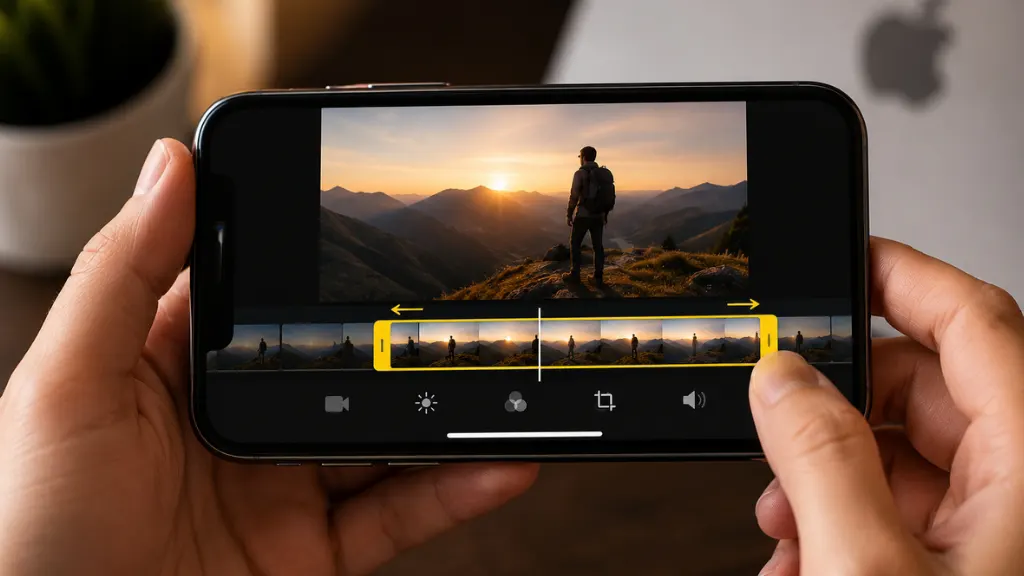
How to Trim a Video

One of the most common edits is trimming unwanted footage.

To trim:

  • Drag the yellow handles at either end of the timeline
  • Remove unnecessary beginning or ending sections
  • Tap Done
  • Save as a new clip or overwrite the original

Trimming helps remove mistakes, pauses, and unnecessary scenes.

How to Crop and Straighten a Video

If your video isn’t perfectly aligned, you can adjust it.

Tap the Crop icon to:

  • Rotate the video
  • Straighten crooked footage
  • Change aspect ratio
  • Crop unnecessary edges

This is especially useful for social media content.

How to Adjust Lighting and Colors of a Video

The Photos app includes several professional adjustment tools.

You can modify:

  • Brightness
  • Exposure
  • Contrast
  • Saturation
  • Warmth
  • Highlights
  • Shadows
  • Black Point
  • Vibrance

Small adjustments often make videos look much more professional.

Avoid increasing brightness too much, as this may reduce image quality.
How to Apply Filters in a Video

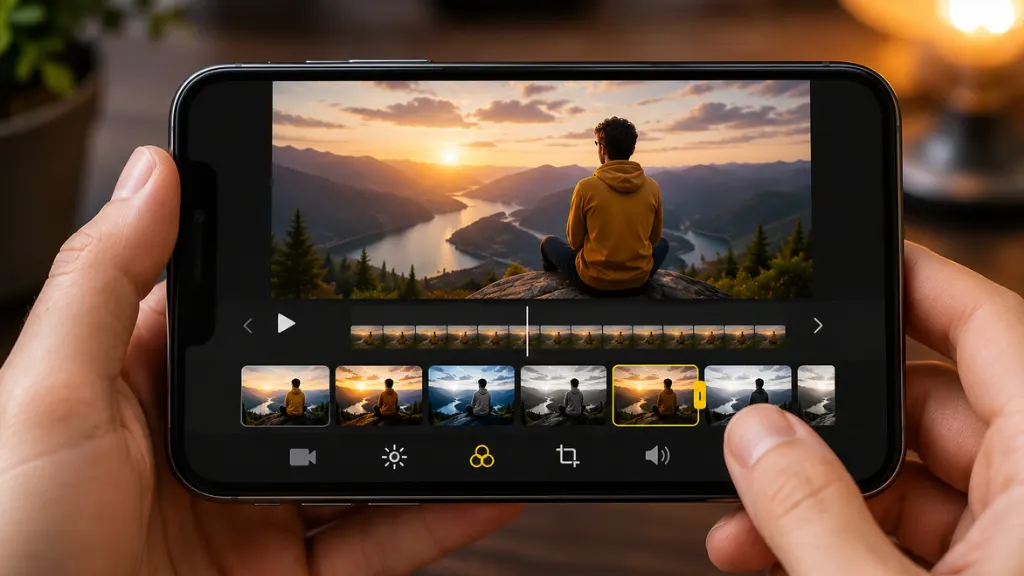
How to Apply Filters in a Video

If you want a consistent visual style, use built-in filters.

Popular filters include:

  • Vivid
  • Dramatic
  • Silvertone
  • Noir
  • Warm
  • Cool

Filters can improve the mood without requiring manual adjustments. Use them sparingly for a natural appearance.

How to Remove Unwanted Audio from a Video

Sometimes background noise ruins an otherwise perfect clip.

Inside the Photos editor:

  • Tap the speaker icon
  • Mute the original audio completely

You can later add music using another editing app.

Final Thoughts

Editing videos on iPhone has become easier. The Photos app does basic edits: Trimming, cropping, color adjustments, and various apps like iMovie, CapCut, VN Video Editor & InShot can help create professional-looking content.

Novice video editors think that using every effect they have helps their videos, but the way to better video is clarity through clean cuts and even audio, whilst pleasing visuals. And within a small time, your iPhone can transition into a shabby tool to film shareable videos that you can post wherever you want.

Whether you’re new to recording family memories or are a content creator looking to build an audience online, learning how to add polish and shine to your videos using iPhone video editing is a powerful skill that can bring your production quality up several notches.

FAQ's

Can I edit videos on my iPhone without downloading an app?

Yes. The built-in Photos app that comes with every single iPhone allows you to trim your video, crop it, rotate it, and edit the exposure and brightness. Great for basic video editing.

What is the best free video editing app for iPhone?

These are the best free video editing apps for iPhone: iMovie. CapCut. VN Video Editor. InShot. These tools have lots of facilities to edit a video like a pro.

How do I trim a video on my iPhone?

Select your video, tap Edit, then drag the yellow handles on either side of the timeline to take away sections that are unwanted. Click on Done to save your edited video.

Can I add music and text to videos on an iPhone?

Yes. Photos app offers limited editing, but you can use iMovie, CapCut, and InShot apps to add background music, text, subtitles, stickers, and transition effects into your videos.

What video quality should I export from my iPhone?

For most uses, 30 FPS at 1080p (Full HD) during export gives a superior quality video at reasonable file sizes. But if you are making professional content and recorded in 4K, then export in 4K if you want the maximum resolution.

  • Facebook
  • LinkedIn
  • WhatsApp

(Visited 7 times, 7 visits today)

Post navigation

< Previous
Next >

Leave a Reply Cancel reply

Your email address will not be published. Required fields are marked *

Top Services:

  • Clipping Path Service
  • Car Image Editing Service
  • Ghost Mannequin Service
  • Product Photo Editing Service
  • Multiple Clipping Path Service
  • Ghost Mannequin Service
  • Color Change Service
  • Drop Shadow Service
  • Color Change Service
  • Photo Editing Service
  • Image Masking Service

Popular posts:

  • How to Create See-Through Clothes in Photoshop: Easy…Photoshop see-through clothing effect guide
  • How to Move Eyes in Photoshop and Online ToolsHow to Move Eyes in Photoshop and Online Tools
  • How to Clip in GIMP: Step-by-Step Guide to Clipping…Step-by-Step Guide to Clipping Mask & Image Editing
  • How to Reverse Video in Photoshop: Photoshop GuideHow to Reverse Video in Photoshop Photoshop Guide
  • How to Export Photoshop ActionsHow to Export Photoshop Actions
  • How to Create an Alpha Channel in Photoshop?How to Create an Alpha Channel
  • How To Fix A Lazy Eye In PhotoshopHow To Fix A Lazy Eye In Photoshop
  • How to Fix a Dark Polaroid Picture? Easy Solution to…How to Fix a Dark Polaroid Picture
  • 10 Professional Photo Manipulation Artists You Must Follow10 Professional Photo Manipulation Artists You Must Follow
  • Guide to Using Blood Brushes for Photoshop:…Guide to Using Blood Brushes for Photoshop Everything You Need to Know

Recent Post

  • How to Edit Signature in Outlook: A Complete Guide
  • How to Edit Photos on iPhone: A Complete Beginner to Pro Guide
  • How to Edit Videos on iPhone: A Complete Beginner’s Guide
  • How to Clipping Path in Photoshop: A Step-by-Step Guide
  • How to Make a Clipping Path in Illustrator: A Step-by-Step Guide

Categories

  • Background Removal
  • Car Photo Editing
  • Clipping Path
  • Color Correction
  • Ghost Mannequin
  • Image Masking
  • Photo Editing
  • Photo Editing Services
  • Photo Retouching
  • Product Photo Editing
  • Tutorial
  • Vector Editing

About CCI

Clipping Creations India is a brand operated by Arafin Media. Here, every pixel tells a story. We offer our unparalleled service and invest our most talented minds at your solution whether you are a photographer or an agency. We are the gateway to exceptional photo editing services!

Get Your Quote

Quick Menu

  • About Us
  • Contact Us
  • Blog
  • Terms and Conditions
  • Privacy & Policy

Payment Method

  • PayPal
  • Stripe
  • Western Union
  • Skrill
  • Payoneer
  • Wise

Get In Touch

+8801715-491890

hello@clippingcreationsindia.com

Canada Office: 1401-2900 Carling Ave. Ottawa, ON, K2B 7J6

India Office: C-20, Lajpat Nagar 3, New Delhi, Delhi 110024, India

Bangladesh Office: 15 Bijoy Nagar, Abdur Rouf Tower (6th Floor), Dhaka – 1000, Bangladesh

Copyright © 2012 - 2026 Clipping Creations India | All rights reserved.

  • facebook
  • twitter
  • instagram
  • pinterest
  • linkedin

Live Chat