
Dark Shadow Photo Editing: A Complete Guide to Creating Professional and Dramatic Images
- June 30, 2026
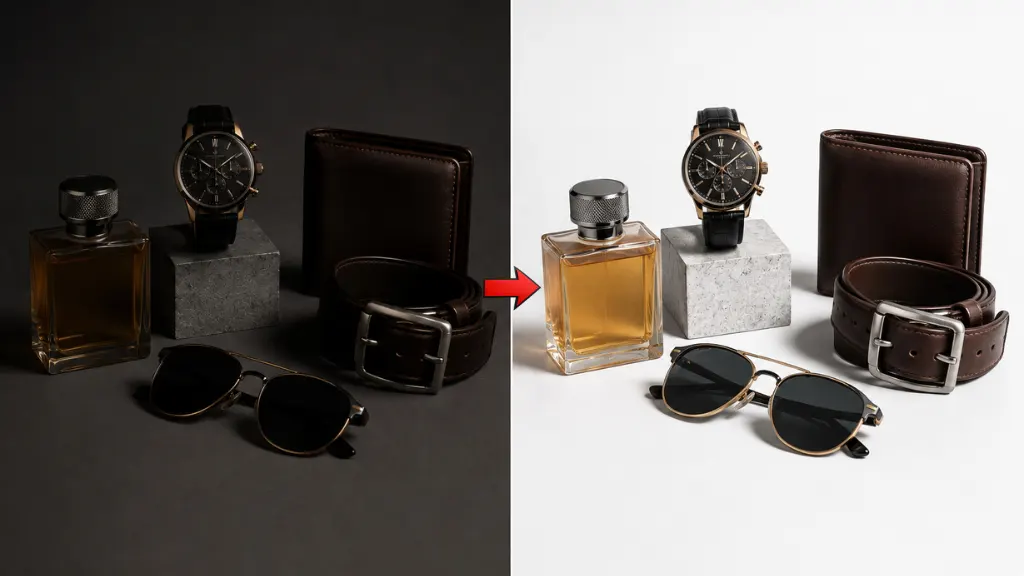
Lighting plays a major role in photography, but shadows are equally important. When used correctly, shadows add depth, dimension, realism, and emotion to an image. However, poor lighting can also create unwanted dark areas that hide important details. This is where dark shadow photo editing becomes valuable. Professional editors carefully enhance, soften, remove, or create shadows to improve the overall appearance of an image while maintaining a natural look.
Whether you are an eCommerce business, photographer, graphic designer, or marketing agency, understanding dark shadow photo editing can help you produce more attractive and professional visuals. Instead of simply brightening every image, experienced editors know how to balance highlights and shadows to create visually appealing photographs.
In this guide, you’ll learn what dark shadow photo editing is, why it matters, common editing techniques, and when professional editing services provide the best results.
What Is Dark Shadow Photo Editing?
Dark shadow photo editing is the process of adjusting the shadows within a photograph to improve depth, visibility, and overall visual balance. Depending on the project, editors may lighten overly dark areas, enhance existing shadows for a more dramatic effect, or create realistic natural shadows for products and portraits.
Rather than removing every shadow, professional editors preserve natural lighting while correcting unwanted darkness. As a result, the final image looks polished, realistic, and visually engaging.
Dark shadow editing is widely used in product photography, fashion photography, real estate photography, portrait retouching, advertising campaigns, and commercial image editing.
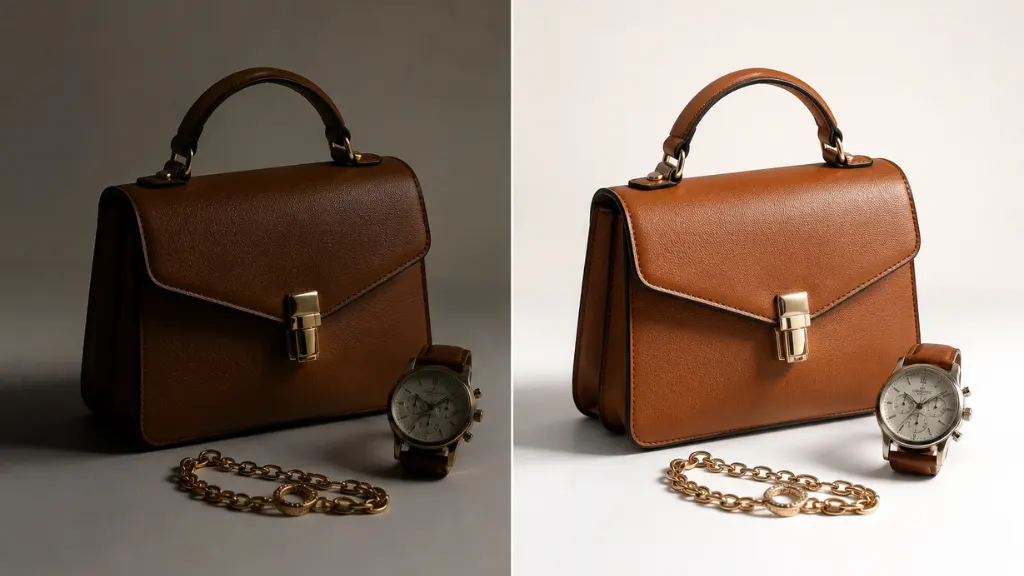
Why Dark Shadow Photo Editing Is Important
Professional shadow editing improves both the technical quality and visual appeal of an image. Instead of allowing harsh shadows to distract viewers, editors use advanced techniques to create a balanced composition.
- Improves Image Depth: Shadows create a three-dimensional appearance that makes subjects stand out naturally.
- Enhances Product Presentation: Well-balanced shadows make products appear realistic instead of floating against a plain background.
- Creates Professional Lighting: Professional editing simulates studio-quality lighting even when the original photograph has lighting imperfections.
- Highlights Important Details: Careful shadow adjustment reveals textures, shapes, and fine details without overexposing the image.
- Strengthens Visual Storytelling: Dark shadows can create mood, drama, luxury, or elegance depending on the style of photography.
Common Types of Dark Shadow Photo Editing
Professional editors use different shadow techniques depending on the image and its intended purpose.
- Natural Shadow Enhancement: Natural shadows are refined to improve realism while maintaining the original lighting direction.
- Drop Shadow Creation: Drop shadows add depth beneath products, making them appear grounded instead of floating.
- Reflection Shadow Editing: Reflection shadows are commonly used for luxury products such as watches, jewelry, electronics, and cosmetics.
- Soft Shadow Editing: Soft shadows create a clean, minimal appearance often used in eCommerce product photography.
- Dramatic Shadow Effects: Creative photography sometimes requires deeper shadows to create cinematic or artistic compositions.
Professional Techniques Used in Dark Shadow Photo Editing
Experienced editors combine several techniques to achieve realistic results.
- Shadow Recovery: Shadow recovery brightens extremely dark areas while preserving texture and detail.
- Dodge and Burn: This advanced retouching method selectively lightens and darkens different areas to improve depth and realism.
- Contrast Balancing: Editors adjust contrast carefully so that shadows remain visible without overwhelming the image.
- Local Adjustment Masks: Masks allow editors to modify only specific shadow regions instead of affecting the entire photograph.
- Color Correction: Shadow areas often contain unwanted color casts. Professional color grading restores accurate tones throughout the image.
Best Practices for Professional Dark Shadow Photo Editing
Professional editors follow a structured workflow to create realistic and visually appealing shadow effects. Instead of making dramatic adjustments, they carefully refine each image while preserving its natural lighting.
Preserve Natural Light Direction
Every light source creates shadows in a specific direction. Professional editors always maintain this direction when enhancing or creating shadows. As a result, the final image looks realistic rather than artificially manipulated.
Avoid Overly Dark Shadows
Although dark shadows add depth, excessive darkness can hide important details. Therefore, editors balance highlights and shadows carefully to maintain visibility.
Match Shadow Intensity
The intensity of every shadow should match the lighting conditions in the original photograph. Soft lighting produces soft shadows, while direct lighting creates stronger shadows.
Use Non-Destructive Editing
Professional image editors use adjustment layers and masks whenever possible. This workflow preserves the original image and allows future refinements without reducing quality.
Maintain Consistent Editing
For product catalogs and commercial photography, every image should have consistent shadow styles. Uniform editing improves branding and creates a professional shopping experience.
Common Mistakes to Avoid
Even experienced photographers can make mistakes when editing shadows. Fortunately, avoiding these issues leads to cleaner and more professional results.
- Using Artificial-Looking Shadows: Poorly placed shadows often appear unrealistic and immediately reduce image quality.
- Increasing Contrast Excessively: Too much contrast causes shadows to become solid black, removing important textures and reducing realism.
- Ignoring Color Casts: Dark areas sometimes contain unwanted blue, green, or purple tones. Professional color correction removes these color shifts.
- Applying the Same Shadow to Every Image: Each photograph has unique lighting conditions. Editors should customize shadow adjustments instead of using identical settings across all projects.
- Overusing Shadow Recovery: Brightening shadows too much creates flat-looking images with reduced depth. Balanced adjustments always produce better results.
Final Thoughts
Professional dark shadow photo editing is much more than simply darkening or brightening an image. It is a precise editing process that improves depth, realism, lighting balance, and overall visual impact. Whether you’re editing product photos, portraits, fashion images, or real estate photography, well-crafted shadows make photographs look more polished and engaging.
By combining natural lighting, balanced contrast, realistic shadow placement, and professional retouching techniques, editors create images that attract attention and build trust. If your business depends on high-quality visuals, investing in professional shadow editing services can significantly improve your marketing materials, online store, and brand presentation.